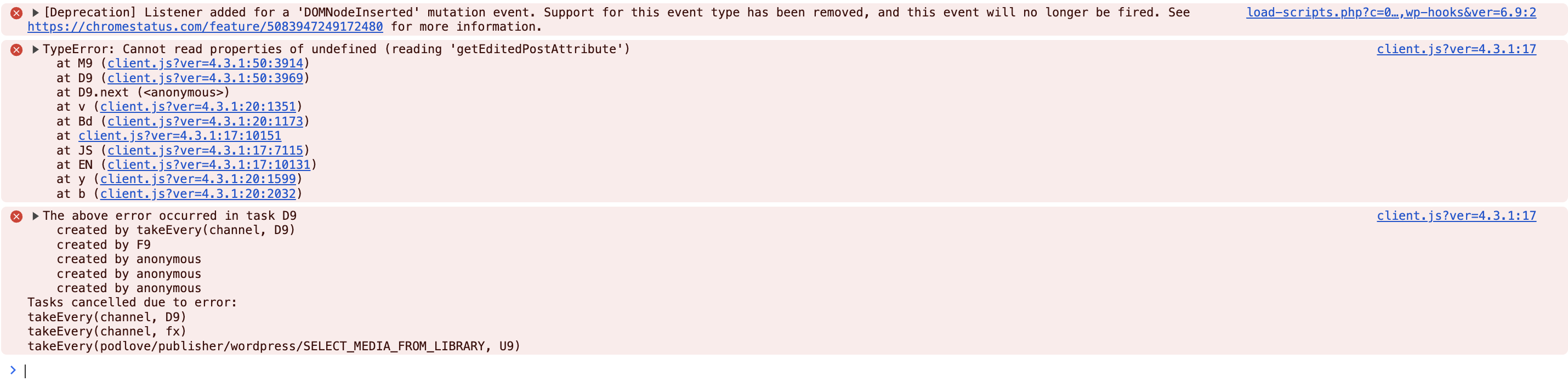
Since the update to WordPress 6.9, the Upload button in the post admin for the Episodes custom post type no longer works. Clicking on it does nothing at all. There is probably some conflict with some Javascript introduced in WP 6.9. On page load 3 Javascript errors appear; I bet they are blocking the event listener bound to the Upload button. This error occurs in the latest version in all of: Safari, Chrome, Firefox, and Orion on macOS 15, using Podlove Publisher 4.3.1.
I can, for the time being, manaully upload files and add the file url manually, but this is frustrating because it means my podcast mp3s are not listed in WP’s Media Library. And I imagine there are lots of users who do not know how to FTP / do not have FTP access to manaully upload.
A recommendation beyond fixing the bug: add a seperate button that allows users to select from an already-uploaded file. That way, if this button breaks again, it won’t be so critical an issue.
The JS errors: